









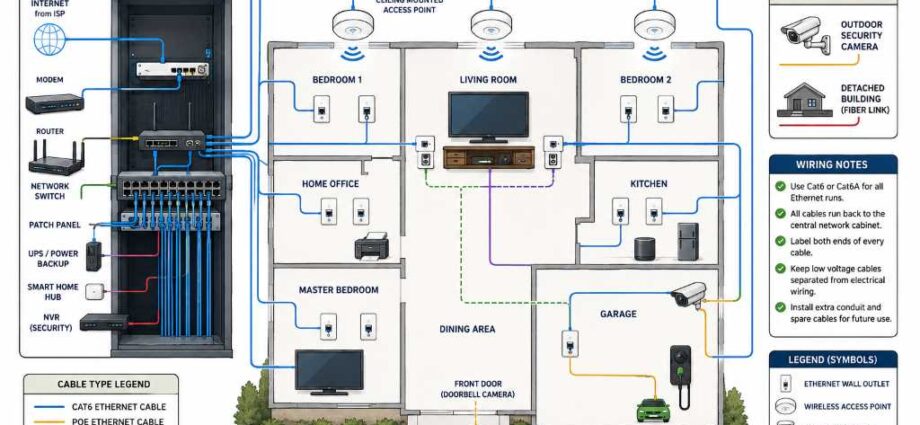
A smart home network wiring diagram for new build should use a centralized structured wiring layout with every cable running to one network cabinet. This design delivers faster speeds, easier upgrades, better troubleshooting, and reliable smart device performance throughout the home.
Planning network wiring before construction saves both time and money during installation. Industry reports estimate connected homes now include dozens of smart devices, while structured cabling can support future technologies without major wall modifications.
Why Every New Build Needs a Smart Home Network Wiring Plan
Modern homes depend on reliable wired connections for security, entertainment, and automation. Therefore, proper planning prevents weak signals and unnecessary future renovations.
Every room should connect directly to a central distribution point using quality Ethernet cables. Before selecting connected equipment, review this helpful guide about how to buy vacuum cleaner accessories because many smart appliances also require dependable network access.
A structured wiring design improves network stability across the entire property. Consequently, homeowners experience fewer connection problems and faster communication between smart devices.
Understanding the Smart Home Network Wiring Diagram
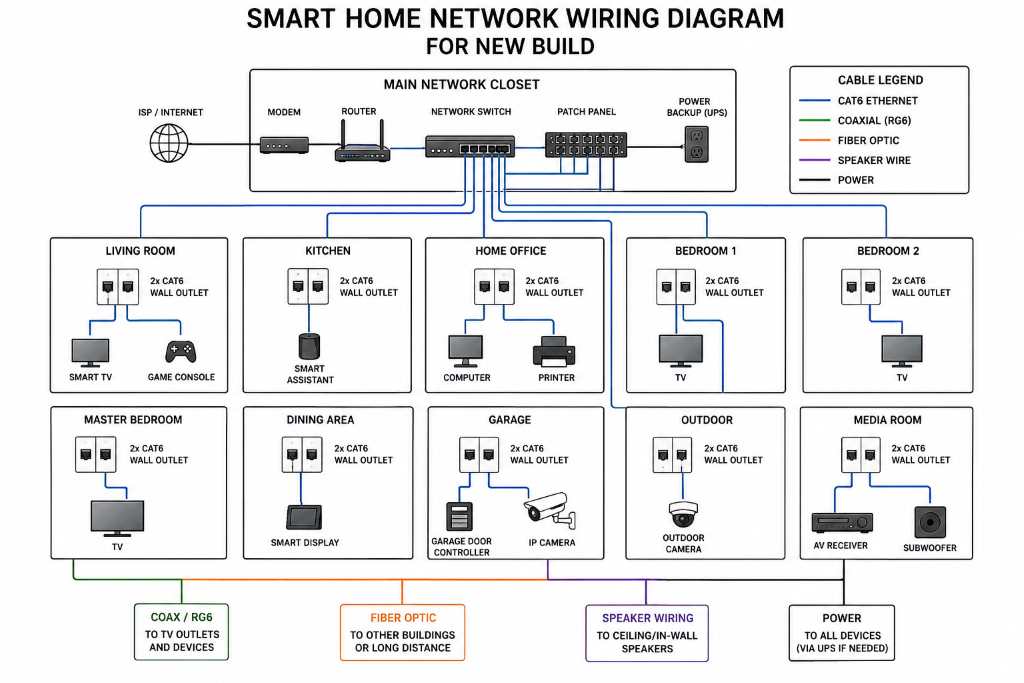
A wiring diagram shows every cable path from each room back to the central cabinet. As a result, installers complete the project with greater accuracy.
Unlike traditional electrical drawings, network diagrams focus on communication cables instead of power circuits. Each connection receives a clear label for future maintenance.
The central cabinet normally contains networking equipment and cable terminations. Furthermore, this location keeps future upgrades simple and organized.
Basic Wiring Flow
- Internet service enters the home.
- Modem connects to the router.
- Router connects to the network switch.
- Switch connects every Ethernet wall outlet.
- Wireless access points connect through Ethernet.
- Security devices connect directly to the switch.
- Smart hubs communicate with connected devices.
Essential Components Inside the Network Cabinet
A centralized cabinet creates a clean and expandable networking system. Therefore, installers can quickly identify every cable connection.
Most new homes benefit from professional cable routing techniques. You can better understand protected cable routing through this guide covering electrical wire installation in conduit methods.
The cabinet should remain accessible while staying away from moisture sources. Proper ventilation also protects networking equipment from overheating.
Recommended Equipment
- Internet modem
- WiFi router
- Managed or unmanaged network switch
- Patch panel
- Power backup unit
- Cable management panels
- Network video recorder
- Smart home hub
Best Cable Types for a Future Ready Home
Choosing quality cables now prevents expensive upgrades later. Consequently, homeowners enjoy better performance for many years.
Cat6 cables support high speed networking throughout most residential properties. Meanwhile, Cat6A provides greater bandwidth for demanding environments.
Fiber optic cables offer exceptional long distance performance between detached buildings. Additionally, installing spare conduit supports future expansion with minimal effort.
Recommended Cable Choices
- Cat6 for standard networking
- Cat6A for higher performance
- Fiber optic between structures
- RG6 coax for television systems
- Speaker wire for distributed audio
- Security cable for alarm systems
Room by Room Smart Network Wiring Guide
Every room has different connectivity requirements depending on daily activities. Therefore, planning individual cable runs improves long term flexibility.
Bedrooms often require multiple Ethernet ports for computers, televisions, and gaming systems. Likewise, home offices benefit from additional wired connections.
When planning electrical improvements, homeowners often explore projects like how to install a dimmer switch alongside network upgrades for greater convenience.
Living Room
- Four Ethernet outlets behind television
- Speaker wiring
- Streaming device connection
- Gaming console connection
Home Office
- Four Ethernet outlets
- Printer connection
- Backup network port
- Video conference equipment
Kitchen
- Smart appliance connections
- Voice assistant location
- Security camera cable
Bedrooms
- Two Ethernet outlets
- Television connection
- Smart display support
Garage
- Security camera wiring
- Smart garage controller
- Electric vehicle charger networking
Wireless Access Point Placement
Strong wireless coverage begins with proper access point positioning. Consequently, every device maintains consistent connectivity.
Ceiling mounted access points usually provide wider coverage than shelf mounted equipment. Each access point should connect through dedicated Ethernet cables.
Avoid placing wireless equipment near metal objects or electrical panels. These obstacles often reduce signal quality inside the home.
Security System Network Planning
Smart security devices perform best with reliable wired infrastructure. Therefore, cameras should use Ethernet whenever practical.
PoE technology delivers both power and network connectivity through one cable. This approach reduces installation complexity significantly.
Every exterior camera should connect directly to the network switch. Furthermore, recording equipment should remain inside the secure network cabinet.
Common Wiring Mistakes to Avoid
Many homeowners underestimate future networking requirements during construction. Consequently, additional renovations become necessary later.
- Installing too few Ethernet outlets
- Skipping cable labels
- Ignoring spare conduit installation
- Choosing outdated cable categories
- Using poor quality connectors
- Placing cabinets inside humid locations
- Routing network cables beside power wiring
Careful planning eliminates these avoidable installation problems. Good documentation also simplifies future maintenance projects.
Sample Smart Home Network Wiring Layout
The following layout supports most modern family homes without unnecessary complexity. Additionally, it allows future expansion with minimal disruption.
- Internet service enters utility room.
- Modem connects to router.
- Router connects to 24 port network switch.
- Patch panel organizes every cable run.
- Dedicated Ethernet lines reach every room.
- Ceiling access points connect through PoE.
- Security cameras connect through PoE.
- Smart hub remains inside the cabinet.
- Backup power protects essential equipment.
Planning for Future Technology
Technology continues evolving with faster networking standards and smarter automation systems. Therefore, flexible wiring plans remain valuable investments.
Install additional conduit wherever possible during construction. Extra cable pathways simplify future upgrades without damaging finished walls.
Leave unused patch panel ports for expanding smart devices later. This strategy supports changing household technology needs efficiently.
Conclusion
A smart home network wiring diagram for new build creates the foundation for dependable automation, entertainment, security, and communication. Structured cabling improves performance while making future upgrades much easier.
Start planning your wiring layout before construction begins, work with qualified installers, and document every cable carefully. A thoughtful design today delivers a smarter, faster, and more reliable home for many years.
Frequently Asked Questions
What cable is best for a smart home network?
Cat6 is the preferred choice because it balances speed, reliability, and long term value.
Should every room have Ethernet wiring?
Yes, installing Ethernet in every room provides greater flexibility for future devices.
Where should the network cabinet be installed?
Place it inside a dry, accessible, and well ventilated utility area.
How many Ethernet ports should each room have?
Most living areas benefit from at least two to four Ethernet outlets.
Can WiFi replace structured network wiring?
No, wired networking provides faster, more reliable, and lower latency connections than WiFi alone.